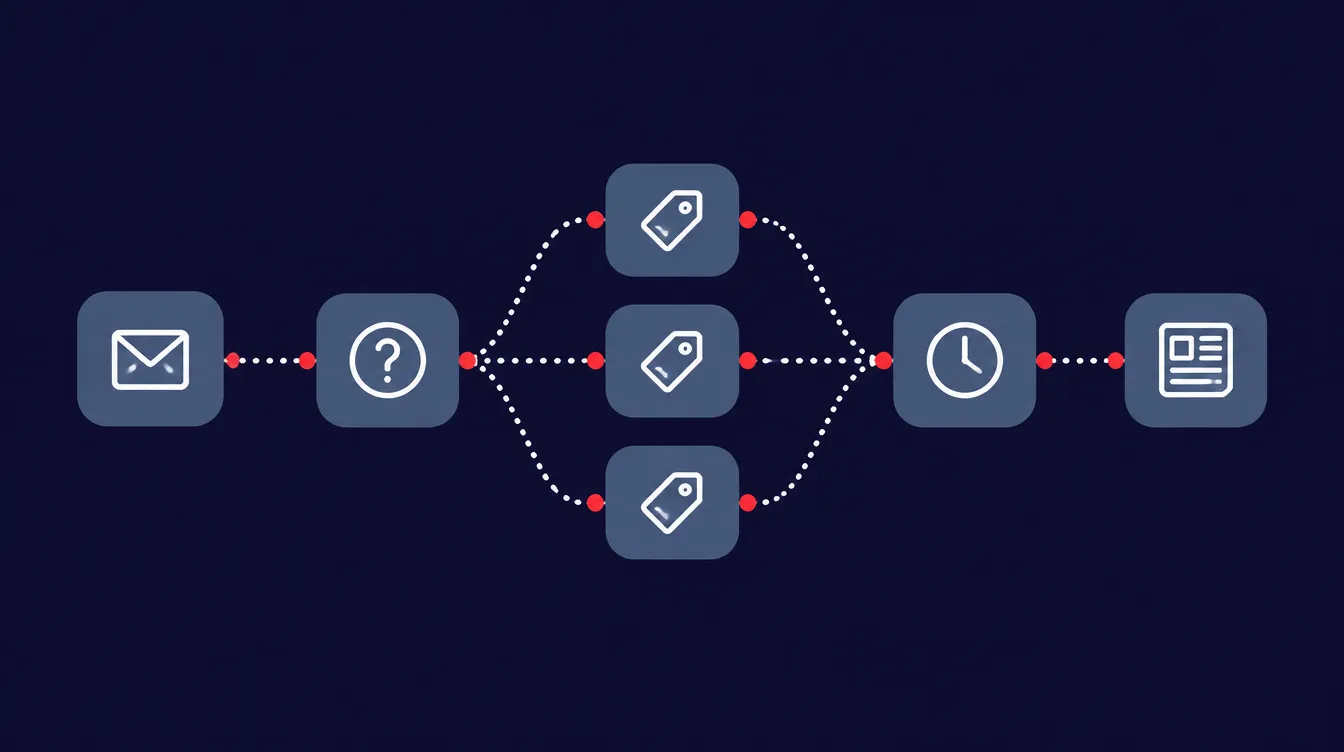
CRM automation is your customer system doing the follow-up for you: every new lead gets a response, gets pointed to the right offer, gets followed up if they don’t buy, and stays in touch until they’re ready. Nobody has to remember. Most small businesses don’t lose sales because their product is wrong. They lose them in the gaps between a lead coming in and someone getting around to it.
We’ve been building these systems since 2008, across most of the major CRMs. The tools change. The thinking doesn’t.
What is CRM automation?
CRM automation means your CRM takes actions on its own when something happens: a form is filled, a call is booked, a payment comes in, someone goes quiet. Instead of a person noticing and responding, the system sends the email, creates the task, updates the record or moves the deal forward.
The CRM is where your contacts and their history live. Automation is the set of rules that act on that history. A CRM without automation is a well-organised address book. With it, it becomes the part of your business that never forgets to follow up.
What’s the difference between a CRM and marketing automation?
A CRM manages relationships with individual people: who they are, what they’ve bought, where they are in your sales process. Marketing automation sends communication at scale: email sequences, newsletters, campaigns. They used to be separate products. Now most CRMs include marketing automation, and most marketing platforms include a basic CRM, which is why people search for “CRM with automation” far more than for either on its own.
The distinction still matters when you plan. Marketing automation answers “what do we send?” CRM automation answers “what happens to this person next?” A good system does both, and the second one is where most businesses have gaps.
What are the benefits of automating your CRM?
The biggest one is speed. A Harvard Business Review study of 1.25 million sales leads found that companies that contacted a lead within an hour were seven times as likely to qualify it as companies that waited even an hour longer, and more than 60 times as likely as companies that waited a day or more. Few small businesses can respond within an hour by hand, every time. An automation can respond in seconds.
The other benefits follow from the same idea. Follow-up happens every time, not just when someone remembers. Leads get the offer that fits them instead of a generic pitch. And because every step is recorded, you can see where any contact is and what they’ve done without digging through inboxes. That last one matters more than it sounds: it’s also what makes your marketing measurable.
What should a small business automate first?
The customer journey, in order. When we build automation for a business, we work through five stages:
- Lead generation. How people come in: a form, a booking, a download, a call. Every entry point should create or update a contact and start the right process. If a lead can arrive without the CRM knowing, nothing after this works.
- Diagnosis. Most businesses solve a small number of distinct problems. We usually find about three. The automation’s first job is to work out which one this lead has, from what they filled in, what they clicked or what they downloaded.
- The matching offer. Once you know which problem they have, they get the product or service built for it. Not your whole catalogue, and not a generic “let’s chat.” The offer that fits.
- Follow-up if they don’t buy. Most people don’t buy the first time. A follow-up sequence answers the objections they’re likely to have and gives them a reason and a path to come back.
- Re-engagement. People who still aren’t ready move into your newsletter, weekly or monthly, whatever suits your business. They stay in touch with you until the timing is right, and the ones who stop engaging get a re-engagement sequence before they’re removed from active sends.
If you’re starting from nothing, build stage 1 and the response half of stage 4 first. Getting every lead an immediate, relevant reply fixes the most expensive gap for the least work.
How do I set up automated workflows in a CRM?
Start with a map, not with the software. We work in four steps:
- Map the current state. Every tool you use, every manual step, every place a lead can fall through. Most businesses find gaps they didn’t know they had at this stage.
- Pick the highest-value wins. Rank the gaps by time saved or by revenue at stake, and build in that order.
- Build it properly. Design, test with real scenarios, and document what each automation does and why.
- Maintain and evolve. Your business changes, your offers change, and your automations need to change with them.
The mistake we see most is starting at step 3: someone opens the CRM, builds a sequence for the thing that’s bothering them this week, and repeats that for two years. The result works, mostly, but nobody can explain how it fits together.
What does CRM automation cost?
The range is wide, and anyone who quotes a price before seeing your setup is guessing. Three things drive the cost:
- Scope. A single lead-response sequence is a small job. A full journey from lead generation to re-engagement, across several offers, is a much bigger one.
- Your data. If your contact records are clean and consistent, building on them goes quickly. If they’re spread across spreadsheets, old platforms and three different tagging systems, the data has to be cleaned up and reorganised before any automation can rely on it. That’s often the largest part of the job.
- How many tools are involved. Connecting your CRM to your calendar, payment processor, website and email platform takes more work than building inside one system.
There’s also the ongoing cost: your CRM subscription, and either your own time or someone else’s to maintain the system as the business changes. Budget for that from the start. An automation nobody maintains is a slow leak.
What features should I look for in CRM automation software?
Look for capabilities, not brand names. The right platform for you depends on your business, but these matter for almost everyone:
- Triggers from every entry point. Forms, bookings, payments and email clicks should all be able to start an automation.
- A clear contact history. You should be able to open any contact and see where they are and what they’ve done.
- Email built in or properly connected. If your email platform and CRM don’t share data both ways, your follow-up will drift out of sync.
- Error reporting. When an automation fails, someone should find out without having to go looking.
- Permissions. The ability to control who can edit live automations. You’ll see why below.
Why do automations break after they’re built?
In our experience, the most common reason is people. Someone goes in and changes something: tweaks an email, renames a tag, pauses a step to test it and forgets to turn it back on, or edits a form the automation depends on. Each change makes sense on its own. Together they break a system nobody can see all at once.
Other people who fix automations for a living report the same pattern, plus a few causes that have nothing to do with your team:
- Expired connections. When a password changes or someone cleans up the apps connected to an account, the link between two tools stops working. One form-integration company calls this the single most common reason integrations suddenly stop.
- A changed field in a connected tool. A field gets renamed, a new required field gets added, or the data comes through in a different format. The automation keeps running but the data it needs isn’t there.
- The software changes underneath you. Vendors update how their systems connect, or retire features. Zapier, for example, automatically turns off a Zap when 95 percent of its runs fail over seven days, which is sensible, but it means a broken connection can quietly become a stopped one.
- The business moves on and the automation doesn’t. A sequence written for last year’s offer keeps sending last year’s offer. Nobody turned it off because nobody remembered it was there.
- No way out. A follow-up sequence without exit rules keeps pitching people who already bought, which is an easy way to annoy a new customer.
That’s why we build checks into every automation: alerts when something stops running, and records that make it quick to find where a contact got stuck. Documentation matters for the same reason. If someone needs to change something, they can see what else depends on it before they do. And limiting who can edit live automations prevents more breakage than any of the technical fixes.
When don’t you need CRM automation?
If you get a handful of leads a month and you personally reply to each one the same day, you don’t need much automation yet. A good CRM and a few templates will do. The same is true if your business runs almost entirely on referrals and repeat clients you already know by name.
You do need it when leads are waiting hours or days for a reply, when follow-up depends on someone remembering, when you can’t tell where a lead is without asking around, or when you’ve built automations over the years and nobody’s sure what they all do anymore.
The bottom line
CRM automation makes sure every lead gets a fast reply, the right offer, a follow-up if they don’t buy, and a way to stay in touch until they’re ready. Map the journey before you open the software, build the most expensive gap first, and put checks in so you find out when something breaks before your customers do.
If you’d like help mapping your current setup, that’s where our Business Automation work starts. Book a 30-minute call and we’ll look at it together.
Sources: James B. Oldroyd, Kristina McElheran and David Elkington, “The Short Life of Online Sales Leads,” Harvard Business Review, 2011. Zapier Help Center, troubleshooting Zap errors. Orbit AI, “CRM integration with forms broken,” February 2026. Solspace, “How to catch broken integrations and API issues before revenue does,” July 2026. Conversion System, “The 5 marketing automation failure patterns,” 2026.
